Custom events on ShowSlow

OK, next step in ShowSlow was to make measured data to be a little bit more useful for analysis – previous change of adding rule grades was useful, but simply replicates YSlows functionality and you should be using YSlow itself to get this data.

This time I’ve added something that almost no analytics systems have for some reason – custom events reported directly on the main graph (originally this idea came from building of custom web analytics software).

So, how does this work? First , you can report any event that happened to the site during some time frame (or at specific moment). To do so you can use a beacon located under /beacons/events/ in you installation – see it in action here: http://www.showslow.com/beacon/events/

You can use a simple web form to add data or you can write an automated script that will send events there automatically.

When submitting events, make sure you specify URL prefix to have your events being reported only for sites that these events actually affect (I assume that you’ll be running it locally for just a few sites and not whole internet). In addition to event title, you can also add resource URL that will link to the page related to the event (e.g. blog post, updated file in your Subversion repository or Bugzilla page that describes fixed bug).

You can also add “type” field to distinguish between the events (e.g. “blog post”, “svn” or “bug”) – hope to have those colored differently in the future.

So, when after you have events in your system, they will be displayed on a timeplot chart as vertical lines or areas (if it was a continuous event where you specified end date/time). When you hover over the event, it gets orange border and when you click on it, note bubble pops up with event title (and link if it was provided):
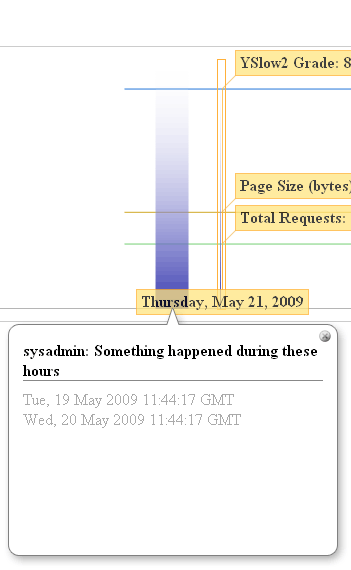
ShowSlow events

So feel free to automate the event gathering process – looks like I’m going to set up CSS/JS changes to be reported there as first thing on my internal instance.
“Tools of the trade” meeting was a good start!

Meeting last night was a good start!

Thanks to everyone who attended, I hope you enjoyed it.

I think it was important to see that front-end performance is a very important topic among the community, but still there are some topics of traditional back-end performance/load-testing/scalability/reliability that a worth have some events dedicated to; maybe we’ll even have some joint event with some operations meetup for those.

Next time I’ll also try not to forget my camera so I can share photos with you, but feel free to take and post yours. Also, if you’re going to blog about the event, please send links to the mailing list or the message board (even if your post is not favorable ;)).

We already have two events scheduled in June and July, but feel free to send me your suggestions regarding the topics you’d like to discuss or present at the meetup!

Once again, thank you to Nicholas Tang and Interactive One for hosting us and I’ll see you on our next meetup at Etsy (http://www.etsy.com/) on June 16th.

YSlow 2.0 and ShowSlow 0.2 with updated beacon

ShowSlow logo

Just a few days ago I wrote first version of ShowSlow and then released it Open Source.

But progress is unstoppable and Yahoo! released long-awaited YSlow 2.0 so it’s time for ShowSlow 0.2.

This means that I’m sitting down and analyzing Beacon parameters to make sure ShowSlow can collect data properly – so here’s the list of parameters that YSlow 2.0 is sending with the beacon (actual set of y* parameters depends on the profile used – ydefault sends them all):

Once again, to configure YSlow to send your data to a beacon, you need to set a couple configuration parameters on about:config page of your browser:

for YSlow 1.x

  • extensions.firebug.yslow.beaconUrl = http://www.showslow.com/beacon/yslow/
  • extensions.firebug.yslow.optinBeacon = true

for YSlow 2.x

  • extensions.firebug.yslow.beaconUrl = http://www.showslow.com/beacon/yslow/
  • extensions.firebug.yslow.optinBeacon = true

Where beacon URL is either public: http://www.showslow.com/beacon/yslow/ (your measurements will be shown to public so please make sure you’re OK with it before you use it) or private URL on your instance which you can get here: http://code.google.com/p/showslow/source/checkout.